It's not a memory leak. It's what your agents started.
 Aditya Singhi7 min read
This was back in June. I was working in cmux, running a bunch of Claude Code sessions, and my laptop just hung. Then this showed up:
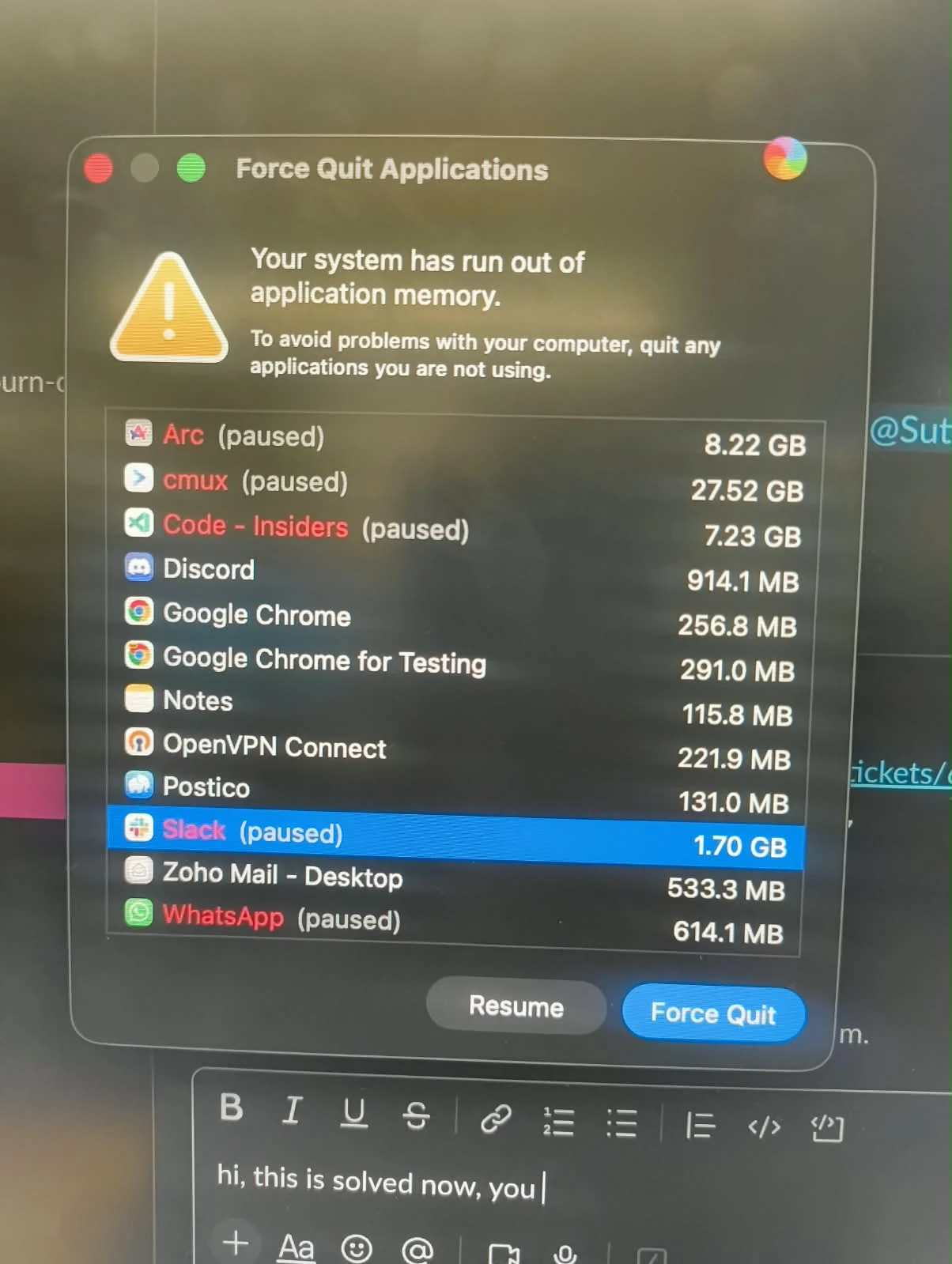
cmux, 27.52 GB. I thought cmux had a memory leak.
So I restarted the Mac, planning to get my agent to audit it and report it to the cmux team.
The Mac came back, reopened all my apps, cmux auto-launched with them, and within seconds, before I could do anything, the same screen again. Force quit did nothing. Pressing it literally did nothing. It was stuck in a loop, and it happened 5 times 😭
My EM walked over, laughed, and said "aur karo use ye naye naye apps" (go on, keep using these shiny new apps).
We finally brute-forced our way into quitting cmux and disabling it in the middle of a restart. I got scared and switched terminals: opened Ghostty and started my Claude sessions there instead.
To my horror, the same screen. Now Ghostty was eating all the memory 😭 My EM, this time not laughing: why do you keep using these new apps. Me, thinking: bro, Ghostty is written in Zig, it's not supposed to leak like this.
So I gave up, went back to VS Code, opened Claude Code in some random folder, and told it: bro, cmux and Ghostty both have memory leaks, help.
Even my agent got scared and audited fast. And the real culprit wasn't cmux. It wasn't Ghostty either.
It was an MCP server 🫠
What was actually happening
I had a code-indexing MCP server, codebase-memory-mcp v0.8.1, installed for every Claude Code session, with auto-indexing turned on. I had 5+ Claude sessions open in the same work repo, and every one of them had it.
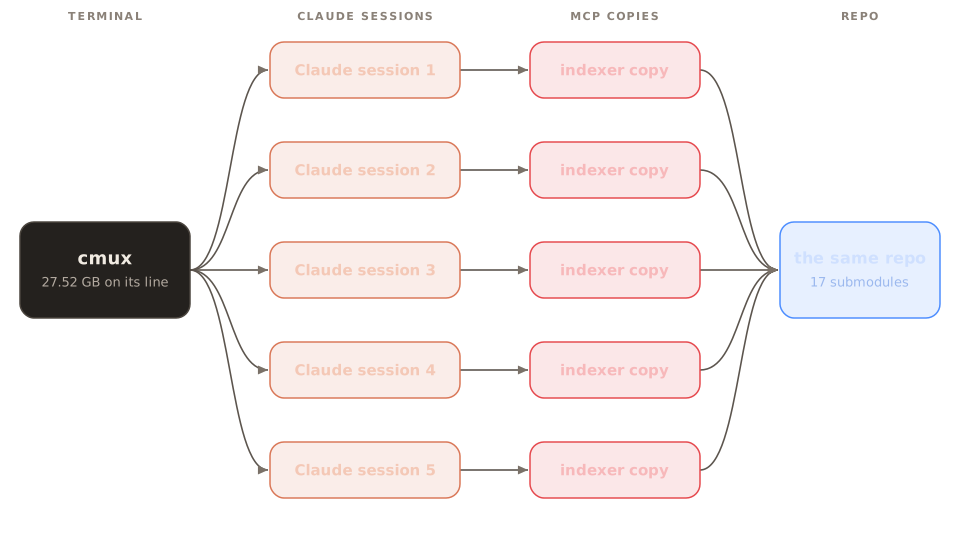
Every Claude Code session starts its own copy of every MCP server. A stdio MCP server is literally a child process of the session that launched it, and nothing is shared between sessions. So five sessions meant five indexers, and all five started indexing the same repo at the same time.
Each one holds the whole index in memory until it's done, and the repo had 17 submodules, so it never got done. Five copies of that was more than my Mac had.
That also explains the loop. cmux reopens your Claude Code sessions when it relaunches, so every restart brought the sessions back, every session started its indexer again, and with no finished index each one started from zero. That's how I got six freezes in a row.
I disabled the MCP, opened cmux again, and everything was fine. Nothing else had changed.
To be fair to the project, its maintainer has fixed most of this since. Indexing now runs in a supervised process, one background service is shared across sessions, and since v0.11.0 the memory budget is a hard limit that spills to disk or stops cleanly.
Why the terminal took the blame
The force quit window didn't lie, exactly. It just counted differently than I assumed.
On macOS, everything an app starts gets counted under that app. cmux started my Claude sessions, and they started the indexers, so the 27.52 GB next to cmux was really theirs.
That's also why force quit didn't help. Killing an app doesn't kill what it started. The indexers kept running and kept the memory.
You've probably seen this too
The day I posted about this on X, my timeline was full of it. Someone got the exact dialog, with Conductor at 49.94 GB. The first reply blamed Conductor. It wasn't Conductor:
 Amaan@amaan8429my M4 pro is dying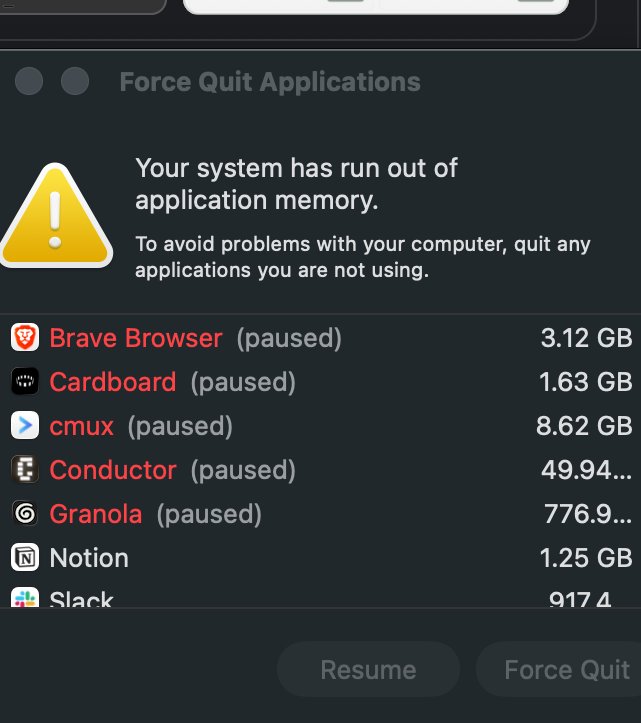
A few days later, the same dialog in Portuguese: "don't use Orca", with Orca at 67.26 GB:
 Bruno Orlandi🔸@BrOrlandiNão usem Orca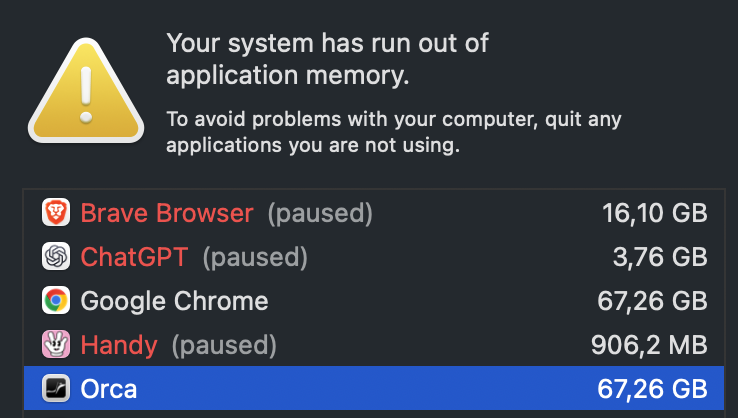
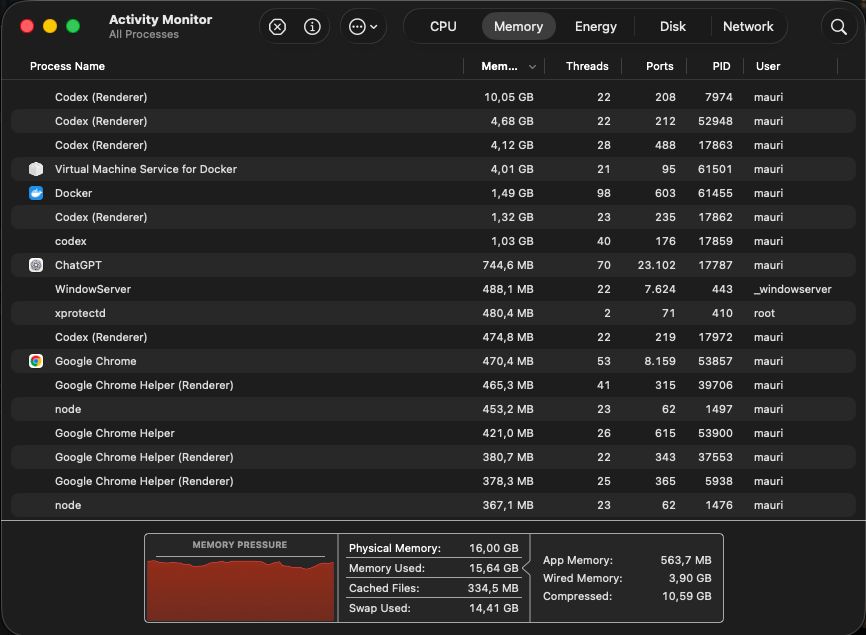
Codex gets it too. To be fair, this one looks like Codex's own processes, so not every screenshot is a child process:
 Maurice@maurice_buildIt's horrible
 Sometimes Codex uses up all the RAM.
My Mac becomes completely unusable then.
Does anyone know how to fix this?
Theo said it best months ago:
 Theo - t3.gg@theoYou guys do realize that Codex and Claude are basically acting as terminals, right?
If your dev server has a memory leak, and Codex spawns it, the memory leak will be credited to Codex.
Imagine posting a screenshot of Ghostty using 100gb of RAM and saying it has a memory leak
Mitchell Hashimoto, who makes Ghostty, on HN: "that window also reports all the RAM child processes are using." And there's a cmux issue where the dialog showed 88 GB on cmux's row, and the logs traced it to test workers that agent sessions had started.
Sometimes the app really does leak, though. Mitchell found a real one in Ghostty a week after that comment, and Cursor wrote about cutting its out-of-memory crashes by 80%. But a lot of the "X ate 60 GB" screenshots are this.
What it taught me
- Your terminal takes the blame for whatever runs inside it, because everything your agents spawn gets billed to the app that started them.
- Every session runs its own copy of every MCP server, with nothing shared. That's a big part of why I lean on CLIs where I can.
- Know what an MCP does when it starts, and don't install random MCPs off the internet without checking.
That day is why wsp has an Activity page
I build wsp, an app that runs your coding agents (Claude Code, Codex, OpenCode, Cursor) on every computer you own, from one window.
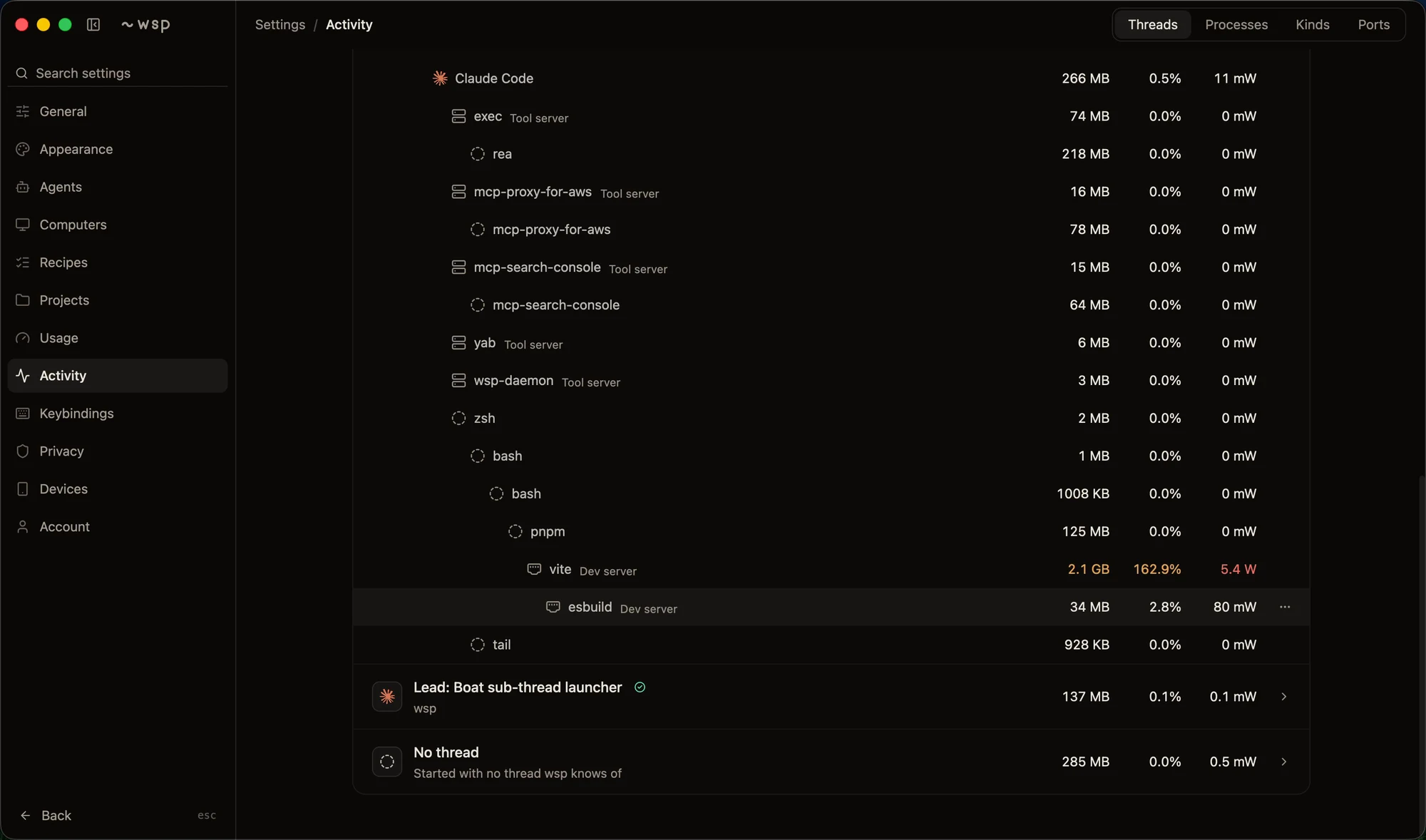
After that day I wanted one thing: to see what's actually eating my memory. Not "cmux: 27 GB", but which thread, which agent, which MCP server, and everything each one started.
So that's what the Activity page shows. Every thread, then its agent, then its MCP servers and tools, then whatever they spawned, each with its memory, CPU and power. Other tabs list every process flat, group them by kind (agents, tool servers, browsers, shells), and show which ports are open and who opened them. Up top, how much of your Mac wsp and its threads are using right now.
How it works
Any activity monitor can read memory. What wsp has to figure out is whose each process is.
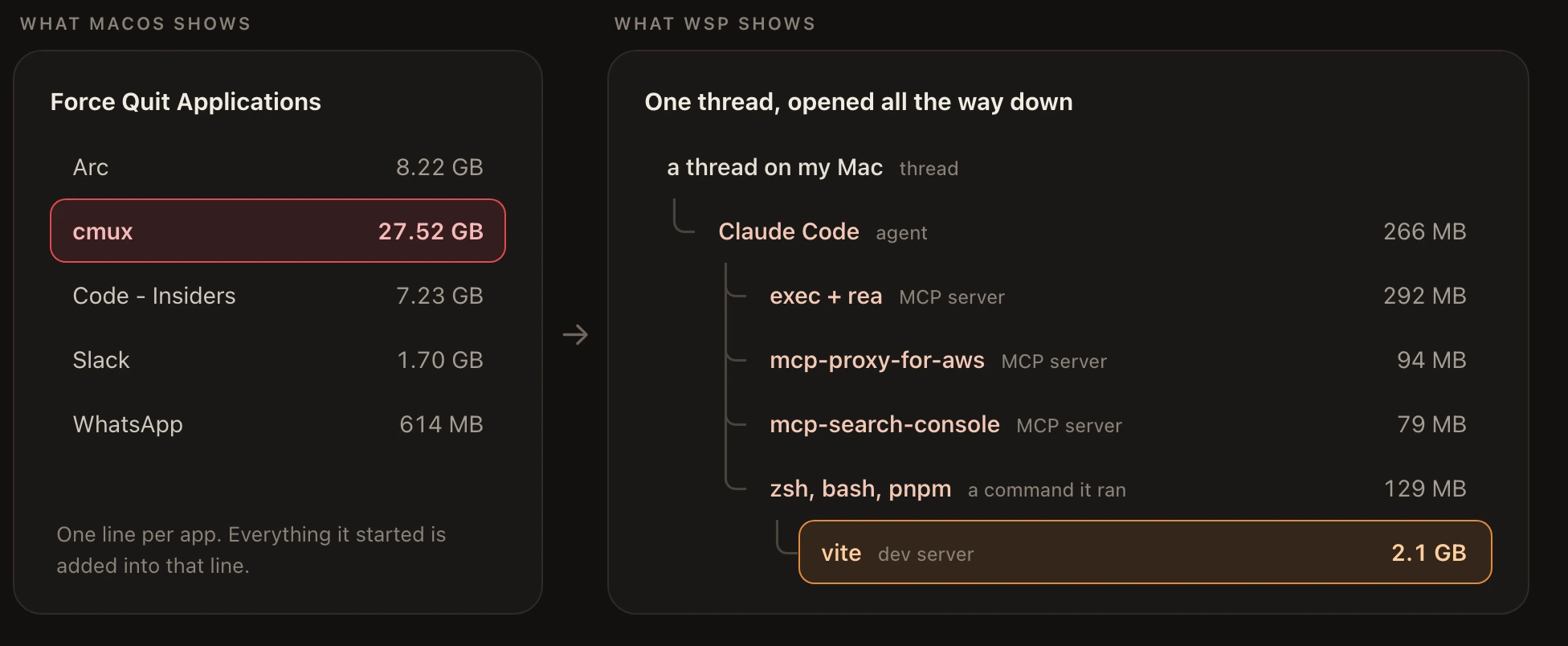
Here's that same thread from my Mac this morning, as a table:
| Process | What it is | Memory |
|---|---|---|
| Claude Code | the agent | 266 MB |
| exec + rea | an MCP server and the tool it runs | 292 MB |
| mcp-proxy-for-aws | an MCP server, two processes | 94 MB |
| mcp-search-console | an MCP server, two processes | 79 MB |
| zsh, bash, pnpm | a command the agent ran | 129 MB |
| vite | the dev server that command started | 2.1 GB |
In the force quit window, every one of those rows would have been added into the terminal's line.
Why it's hard
When Claude Code runs a command, it starts a fresh shell for it, and that shell is gone about 24 milliseconds later. If the command started a dev server or an indexer in the background, the server keeps running, but its parent is gone. macOS hands it to launchd, and nothing on the process points back to the session that started it.
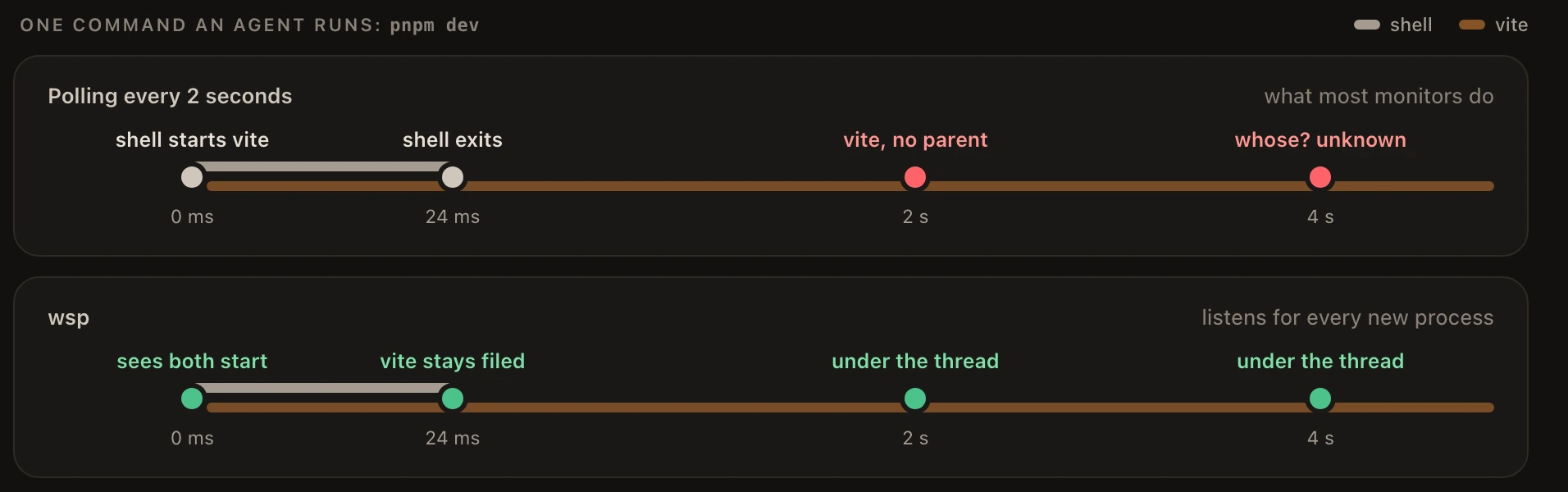
A tool that checks every couple of seconds simply misses most of them. When I tested that on macOS 26.4, polling every 2 seconds kept track of 9 out of 16 test processes.
How wsp works it out
Each computer you add runs a small wsp daemon. On a Mac, instead of looking every few seconds, it asks the kernel to tell it about every new process the moment it starts. So it sees the shell, then vite, and files both under the thread before the shell is even gone. On the same test it kept track of 15 out of 16.
Some processes detach on purpose, with setsid or nohup, to get away from the terminal that started them. That doesn't lose them either: every process a thread starts carries a small label saying which thread it belongs to, and detaching doesn't remove it.
On a Linux box it's simpler. Every thread runs in its own cgroup, a group the kernel keeps for it, so everything inside belongs to that thread no matter who its parent is.
And when wsp can't tell whose a process is, it doesn't hide it. It shows up under "No thread", with its memory, so a leftover indexer can't eat your RAM unseen.
The numbers are the ones you'd see in Activity Monitor: each process's memory footprint, and power from the kernel's own energy counter.
It works the same on every computer you add, not just your Mac.
I wish I'd had this in June. It would have taken one glance instead of six restarts and a very confused EM.