Other devices
You can use your wsp from more than one device. A browser on another computer, or a phone, can pair with your host and open the app. Another computer with the wsp command line can sign in to your account and run every command against your host.
The host is the wsp process that holds your threads and serves the app. It runs on one computer, usually your Mac. Every device talks to that one host.
Sign in to your account
Your account is at the relay, a service that gives your host an https address. You sign in to it with GitHub. Sign in before you put a host on the relay, because a bare wsp host link needs a computer that is signed in.
Settings > Account shows whether this wsp is signed in. The app cannot sign in, so use the command line.
On the computer that you want to sign in, run:
wsp login
It prints three lines together:
word, for a computer that is already signed in.code, for the sign-in page.open, the address of the sign-in page.
The code lasts 15 minutes. Then pick one of two ways:
- If another computer of yours is signed in already, run
wsp login <word>on that computer. This signs the new computer in, and admits it to every host that trusts the computer you ran the command on. - If no computer of yours is signed in yet, open the page, sign in with GitHub, and type the code there. This signs the computer in to read the account, but admits it to no host. To admit it, run
wsp login <id>for it on a computer that is already in.
On a signed-in computer, wsp login with nothing after it lists the account's computers, their ids, and who admitted each one. wsp logout signs this computer out. wsp logout <id> signs another of your computers out.
Reach the host from another device
A device must be able to reach the host before it can pair. There are two ways.
On your own network
The host that the Mac app starts listens only on the Mac. To let other devices on your network reach it, stop it and start it again as a service that listens on an address:
wsp down
wsp up --listen <address> --service
While the app's host runs, wsp up --listen is refused with another wsp host ... is already serving. That is why wsp down comes first.
From anywhere
On the computer that runs the host, put the host on your account at the relay:
wsp host link
On a computer that is signed in, wsp host link asks nothing. On a computer that is not signed in, run wsp host link <url> with the relay's address. Then approve the code it prints on the page it names. The relay gives the host an https address, so no port has to be open to the world. See Computers behind a firewall.
Pair a browser or a phone
-
On the computer that runs the host, run
wsp host pairin a terminal.wsp host pairIt prints a code, when the code expires, and the addresses to open.
-
On the other device, open one of those addresses in a browser. The page says Pair this browser.
-
Type the code in Pairing code and click Pair.
The code is 8 letters and digits, such as ABCD-EFGH. It works once and lasts 10 minutes. Only a terminal on the host's own computer can make a code, since a code lets a device in.
If the host listens only on its own computer, wsp host pair says that the code lets in a browser on that computer and nothing beyond it.
See and revoke devices
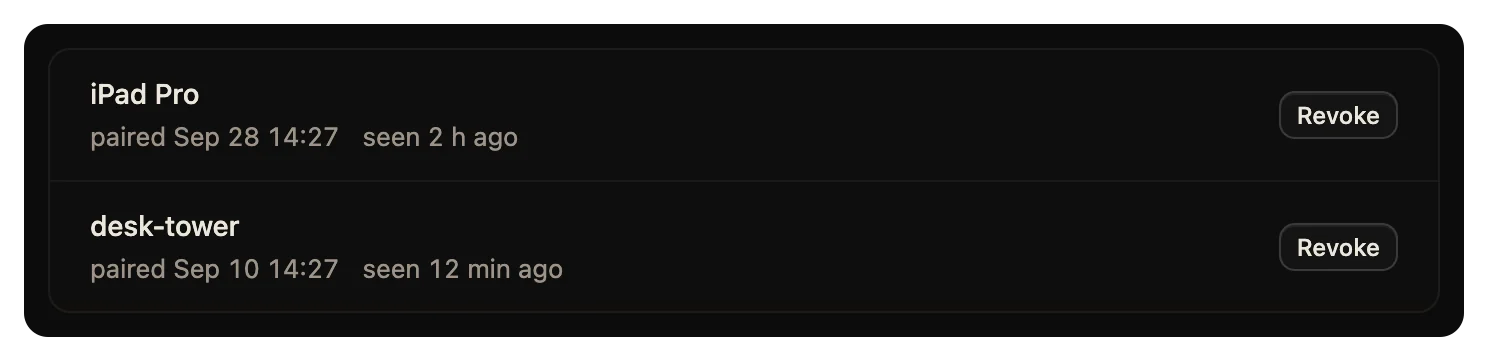
Settings > Devices lists every device paired with your wsp, with when it paired and when wsp last heard from it. The browser you read the list in says this browser.
To take a device out, click Revoke beside it. It can no longer reach your wsp until it pairs again.
From the command line, wsp host devices lists the same devices, and wsp host devices revoke <id> takes one out. The list says how each device came in: by a code, or by your account.
Run commands against a host on another computer
A computer reaches a host on your account only after it is admitted, by wsp login <word> or wsp login <id> on a computer that is already in. The sign-in section above has both ways.
wsp hosts lists every host on your account that this computer can reach. It shows each host's address and state, and marks the one that every command uses by default.
To run one command against another host, add --host with the name that wsp hosts shows:
wsp threads --host studio
To use one host for a whole shell, set WSP_HOST to its name.
With no host named, a command goes to the host on this computer. If none runs here, it goes to the one host on your account. If the account has several hosts, wsp asks you to name one with --host.
The command line reference has every flag: host pair, host devices, host link, login, logout and hosts.
