Computers behind a firewall
Add a computer needs your Mac to reach the new computer over ssh. A computer behind a firewall or a home router often takes no connection in. Such a computer can dial out to you instead, so nothing on it has to be open.
The computer that dials joins your wsp with a one-time code. wsp then runs on it as a systemd service that dials your host again at every boot.
Join a computer
The computer that joins must run Linux. A Mac refuses to join. You need root on it, because wsp installs its daemon as a system service.
-
On the computer the app runs on, run
wsp addwith no argument. It prints onewsp joinline for each address your host answers on:wsp add: a computer you own joins by dialing this host. On that computer, with wsp installed: wsp join http://192.168.1.20:4420 --code <code> -
Install wsp on the computer that joins. See Install on Linux.
-
On that computer, as root, run the
wsp joinline that reaches your host.
The code works once, and for 10 minutes. If it runs out, run wsp add again for a new one.
wsp join tries each address in turn and waits 20 seconds for each. Before it sends anything, it checks that the host proves the key named in the code. So a code reaches only the host that printed it. Then it installs the service and prints:
studio joined the wsp at http://192.168.1.20:4420; it dials that host on its own from now on.
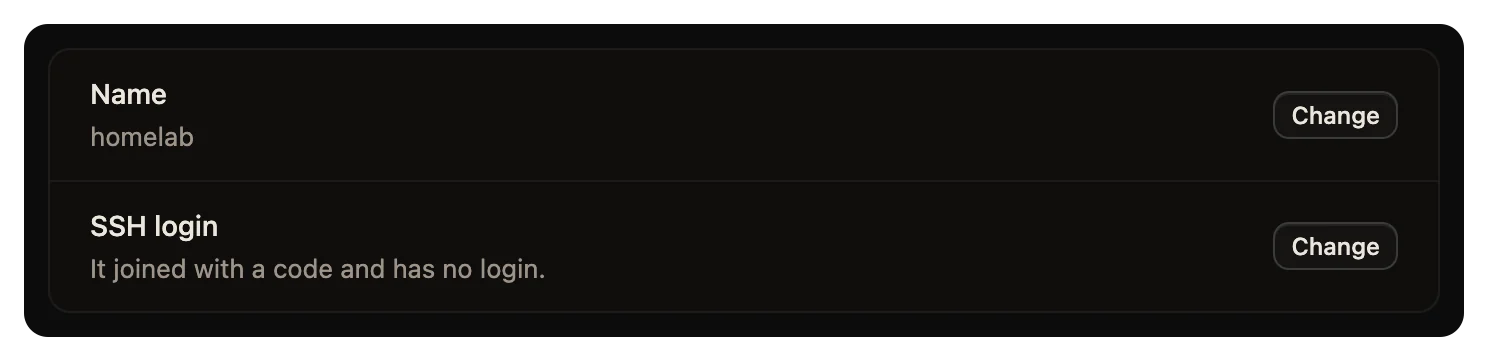
The computer shows in Settings > Computers and in wsp computers within a minute. Its page says "It joined with a code and has no login."
| Flag | What it does |
|---|---|
--code <code> | The code that wsp add printed. |
--code-file <path> | Reads the code from this file, and deletes the file before it dials. Use it to keep the code out of your shell history. |
--name <name> | The name the computer goes by in wsp. |
If the join fails
What wsp join says | What to do |
|---|---|
the host at <url> did not answer in 20 s | Put both computers on one network, or link your host to the relay. Then try again. |
<url> could not be reached: <error> | Nothing answers at that address from this computer, which is common on a closed network. Try the next wsp join line, or link your host to the relay. |
that join code is not one this host is waiting for | The code is used or too old. Run wsp add on the host for a new one. |
this computer is already a place in a wsp | Run wsp leave on this computer first. |
joining a Linux computer needs root | Log in as root, or run the line with sudo. |
The service on the computer
wsp join installs the daemon as a systemd unit, wsp-place-<tag>.service, in /etc/systemd/system. wsp join prints its name and the path of its log. systemd starts it at boot and starts it again 5 seconds after it stops. The daemon dials your host and keeps that link open. Your host never opens a connection to the computer.
When the two computers share no network
The wsp join lines use your host's own addresses, so the joining computer must reach one of them. If it cannot, link your host to the relay:
wsp host link
The relay gives your host an https address that answers from anywhere, with no port open on the host's computer. Then wsp add prints one more join line, for that address, marked "when the host is linked to your relay".
The relay is a directory and an introducer. It knows which computers you own, where each answers, and which key each proves. No join code, no device token, no private key and no byte of a thread passes through the relay itself.
The link between a joined computer and your host is sealed under a key that the two ends agree on. No frame that carries anything of yours crosses before the seal is in place. So the tunnel carries that link, but cannot read it. The app is different. When the app reaches your host over the relay, that connection runs through Cloudflare's tunnel, and Cloudflare can read it on the way. You can skip the relay, or run your own. See The host, the daemon and the relay, What leaves your computer and Run your own relay.
Take a computer out
Taking a joined computer out takes two commands, one on each computer:
- On the host, run
wsp remove <computer>, or click Remove on the computer's page. The host forgets the computer and asks it to delete wsp's own files. A joined computer has no ssh login, so the host cannot take the service off. The wsp service keeps running there, as root. - On the computer itself, as root, run
wsp leave. It asks once, then takes the service and wsp's files off. Your work folder stays.
If the computer is offline when you remove it, the host says that the daemon is still installed, and forgets the computer. When the computer comes back, the host refuses its dial. Run wsp leave on it then.
If the host is gone, run wsp leave on the computer alone. The host still lists the computer until someone runs wsp remove there.
For a step-by-step setup of a computer at home, see A box behind a firewall.
