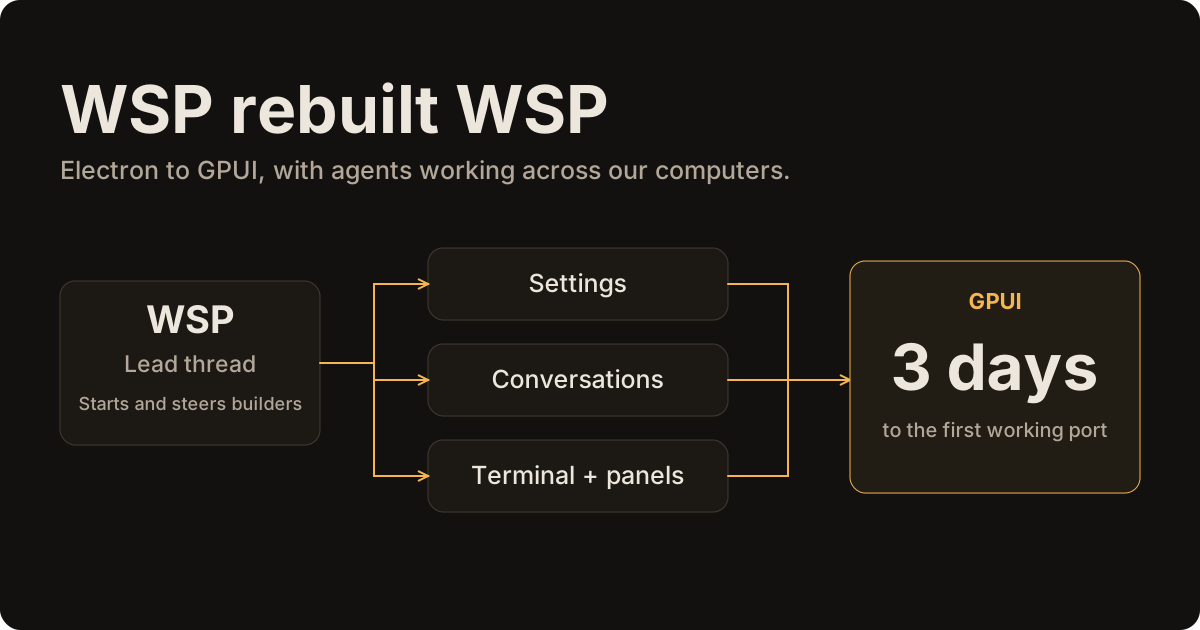
We rebuilt WSP from Electron to GPUI in three days, using WSP
 Aditya Singhi8 min read
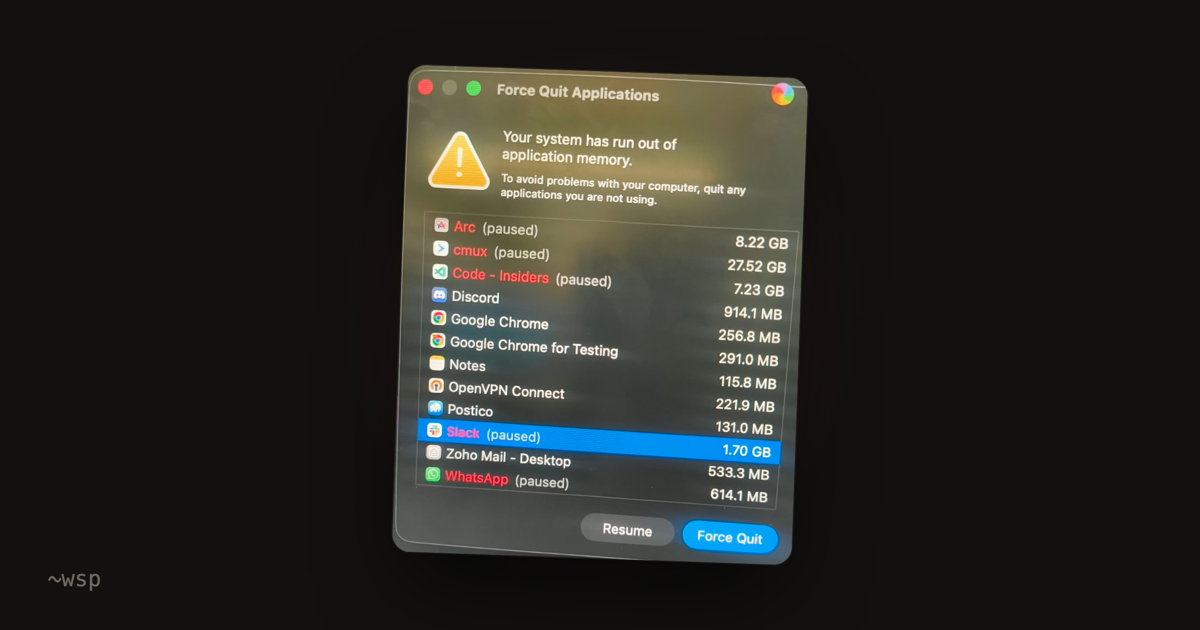
I posted a video of wsp's Activity page, showing which agents and programs were eating my Mac's memory.
There was one slightly embarrassing detail. wsp itself was using around a gigabyte.
I even said it in the post:
wsp itself is heavy rn (1 gb, thanks electron)... the rust port is coming, and now i can measure it
I'd built wsp because running a few coding agents at once made my Mac almost unusable. It let me manage them from one window, move work onto my other computers, and see what was eating the resources.
Now the app I'd built to help with that needed the same attention 🫠
So I asked a Claude Code thread inside wsp to rebuild wsp's interface in Rust, using GPUI, the library behind Zed's interface. That meant we could draw the app without carrying Electron's browser around.
Three days later, I was opening the first working version beside the old app.
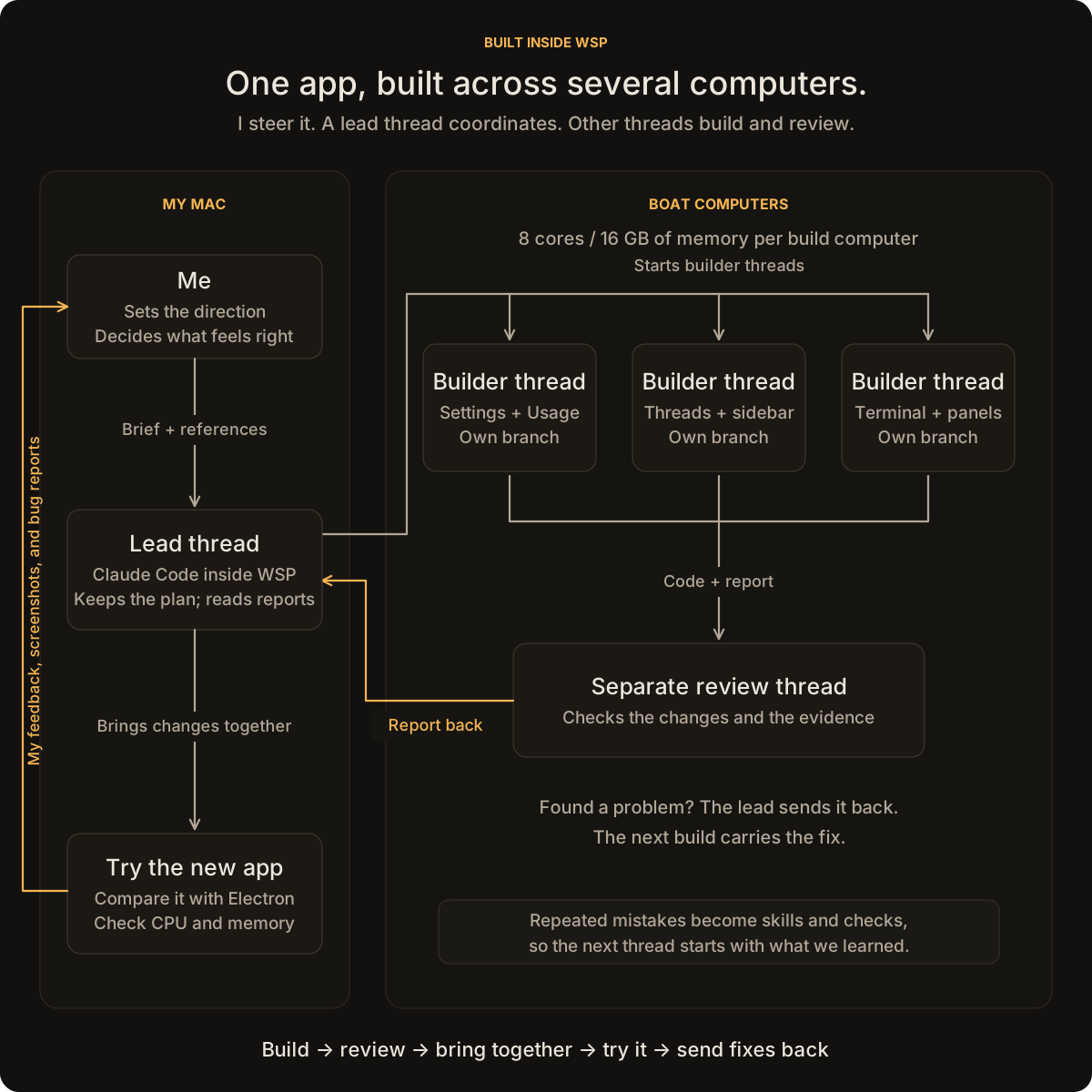
We used wsp to build its own replacement. I kept using the Electron app to follow the agents, steer their work, and send back what broke in the GPUI version.
I liked how wsp looked, though. My instruction was:
the end goal is to make the app look exactly the same as the current electron app, all in gpui
Same fonts. Same spacing. Same blur. Same little animated background. And the memory still had to stay low.
One lead thread, several computers
The lead thread stayed on my Mac. It held the migration plan and started builders on Boat computers with 8 cores and 16 GB of memory each.
Each builder had its own branch, so Settings could move ahead while another agent built the terminal. A separate agent reviewed the changes. Reports came back to the lead, which sent problems back for another pass and brought the changes together.
I could open any builder's conversation in wsp and send a correction while it worked.
My part was deciding what I wanted, trying the app, and sending back what felt wrong.
I'd open a build beside Electron. A menu felt wrong, a page was missing something, or the memory climbed. I'd send that back, often with a screenshot. The lead turned it into the next round of work.
What we gave the builders
The window wasn't all of wsp. The host already kept track of conversations and ran the agents.
We could give it a new window and run both apps side by side.
That kept Electron shipping and gave us a working reference for every screen.
Cap's notes on its move to GPUI covered the boring questions too: rebuilding quickly, running both apps, comparing screens, and moving users across.
For the actual buttons, text fields, menus, and dialogs, we used gpui-kit. I didn't want every agent making its own version of a text box.
We collected its instructions, Zed's examples, and notes from other people building GPUI apps. herdr had a useful approach to building a screen and checking its screenshot. jayjay had instructions for checking a new app against an old one.
Then we turned that reading into instructions for our own agents. Which components to use. Where to find a working example. What wsp's spacing and colors were. How to take a screenshot and compare it.
Those became our wsp-gpui skill. Builders also read the gpui-kit skill, its design guides, and our WSP design instructions. A skill is a file the agent reads before working. The point was to stop five agents from learning the same lesson five times.
“Build Settings” wasn't enough of an instruction.
- What happens when a list is empty?
- Does Escape close the menu?
- Can you get to that button with the keyboard?
- What happens when a name is too long?
We wrote those things down for each screen, with screenshots of the old app to compare against. The lists eventually held 2,926 things to check.
The first few reviews found enough repeated mistakes that I told the coordinator:
try to learn from the review rounds as where we are doing wrong and make skills for that to prevent in the future...
That became another skill, wsp-gpui-handin: what to check before saying the work was done. We kept adding lessons as we found them.
Some were painfully basic. An agent said it read the design skills, but its conversation started before those files arrived in the project. We had to tell it to open the files. Another read instructions for a different version of the library and tried to use functions we didn't have.
So yes, even the instructions needed checking.
Then I opened the app
Three days in, much of it was there. I tried it beside the Electron app.
And immediately:
bro new thread page lost it character
The box to type in was there. The heading and animated background weren't. The Agents panel was empty. Some headers were a different shade from the rest of the page. Turning transparency on changed the colors without making anything see-through.
It was recognizably an app. It didn't feel like my app yet.
We had screenshot tests. Why didn't they catch this?
Some compared a button or panel on its own. Some allowed enough difference that the wrong background color still passed. And some screens simply weren't in the checks.
We changed that. Open both apps at the same size, on the same page, in the same theme. Compare the whole window. A background being one shade off was still wrong.
The blur and rounded corners also needed work in GPUI itself. We added the missing drawing behavior, then compared the result with the old app. For text, we checked where the letters sat and how wide the same words were.
But pictures weren't enough either.
A scroll test said the app was smooth. My trackpad kept getting stuck. Eventually I noticed it happened when the pointer passed over a card listing changed files. That card was taking the scrolling instead of the conversation.
The test's pointer was somewhere else. It was measuring smooth movement while missing the thing that made scrolling feel broken.
And then the memory started climbing
An early build looked promising: 81 MB with a long conversation open.
Then we scrolled. A later test went from 212 MB to 407 MB. On my real collection of roughly 1,600 threads, a fresh launch was 453 MB.
After switching between conversations for a while, Activity showed 707 MB.
Bro, we moved to Rust to use less memory 😭
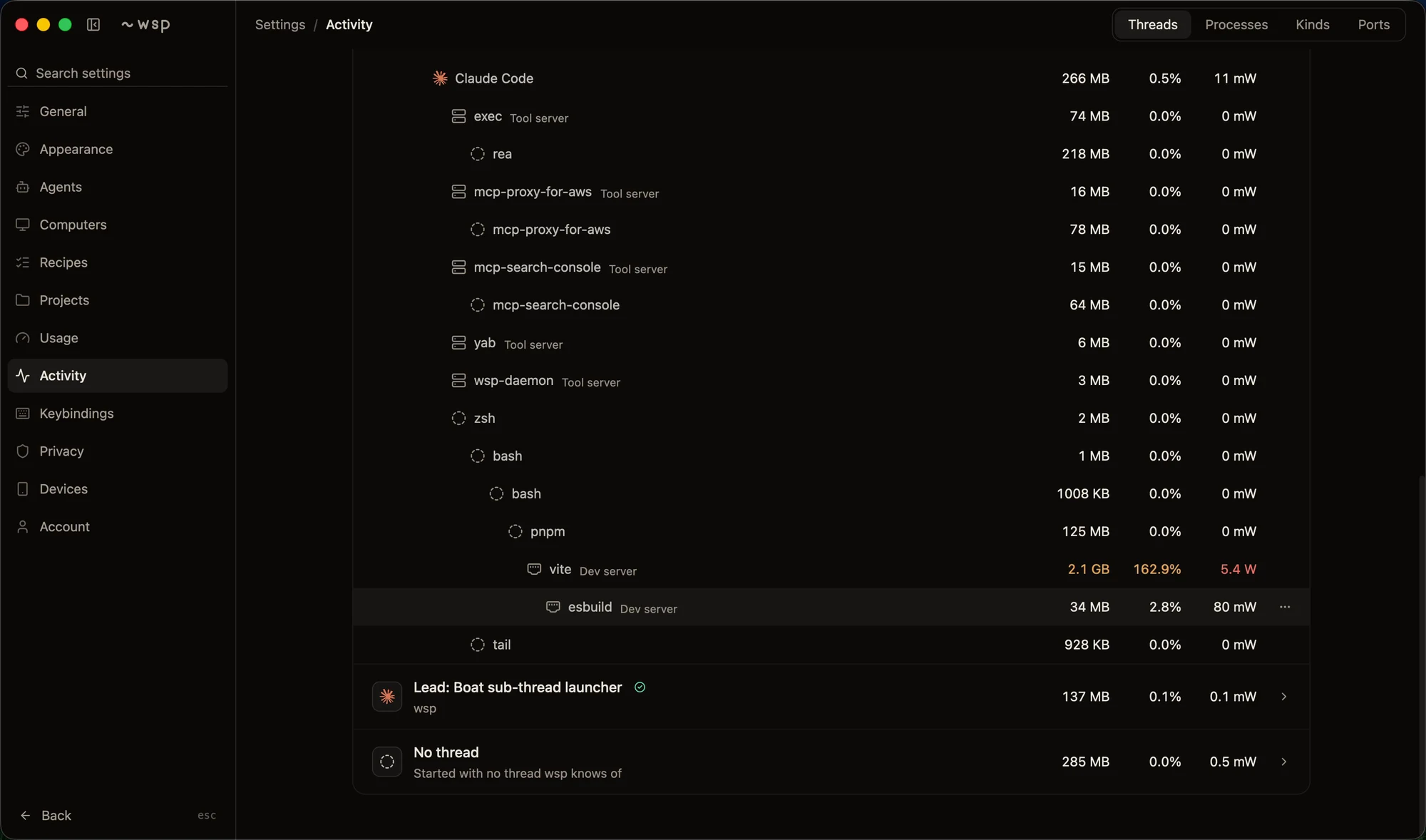
This was where having our own Activity page helped. I could switch threads and watch the number climb. The next question was what the app was keeping.
We opened a separate copy of the app with macOS's memory-recording tools running. Those tell you which parts of the code asked for the memory. They can pause the app while reading it, hence the separate copy.
One answer was almost embarrassingly straightforward: we were keeping the same information three times.
The sidebar needed the thread records. So did the thread list. So did Activity. Each kept its own copy. About 148 MB of the app's working memory went there.
We made them share the records. We also stopped keeping every message's prepared text forever after you scrolled past it.
More things turned up: full-size pictures kept when we only needed thumbnails, space reserved for one large drawing and never given back, images kept after their screen closed.
After those rounds, opening the app with my real conversations used around 250 MB. Changing the language hadn't done that work for us. We still had to find what we were holding and let it go.
The Activity page had its own problem
The page showing resource use was itself using 20.6% CPU while sitting there.
One number on it redrew 37,698 times in 70 seconds. In that measurement, only 176 frames actually reached the screen.
Every time a reading changed, it asked the surrounding page to draw again. A little CPU number could cause Settings and the rest of the window to do work too.
The animated background, spinners, clocks, and blinking cursor had versions of the same problem.
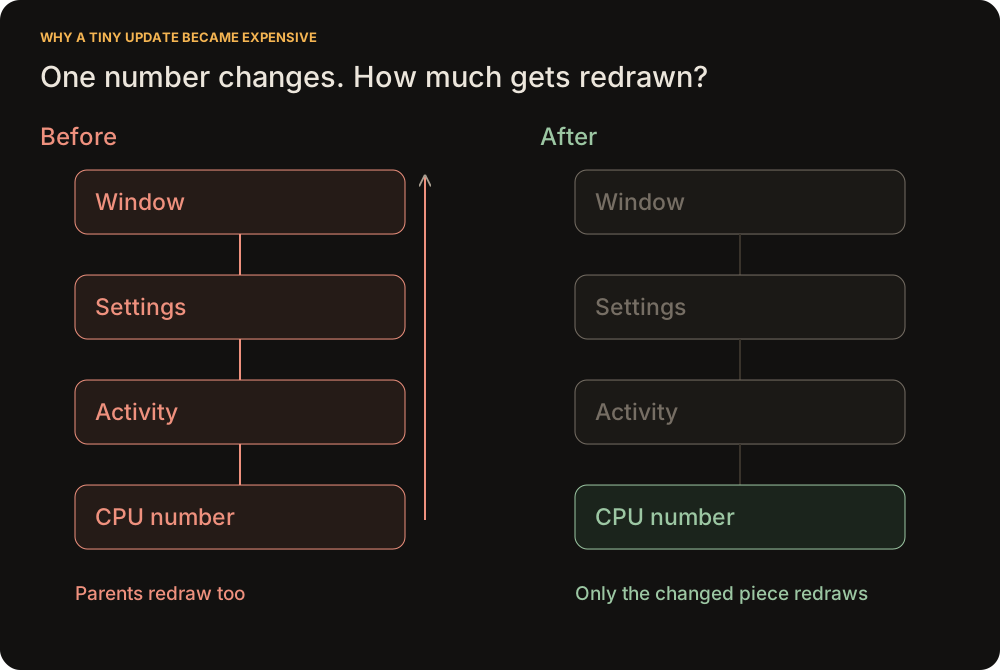
We recorded where the app spent its CPU time. A lot went into arranging the Settings page again and again.
So we gave the moving pieces their own small areas to update. A new reading could change its number without rebuilding the page. An animation hidden behind another screen could stop asking to draw.
We kept the animated background. I liked it. We needed to stop it making everything else expensive.
After the fixes, Activity used 1.7% CPU and 7 mW.
What changed
The first working port took three days. After the fixes, GPUI became the default in WSP 0.3.9 on October 26.
In the side-by-side test using the same conversations, Electron used 438 MiB at rest and GPUI used 180 MiB. The gigabyte I mentioned at the start was an earlier everyday-use reading.
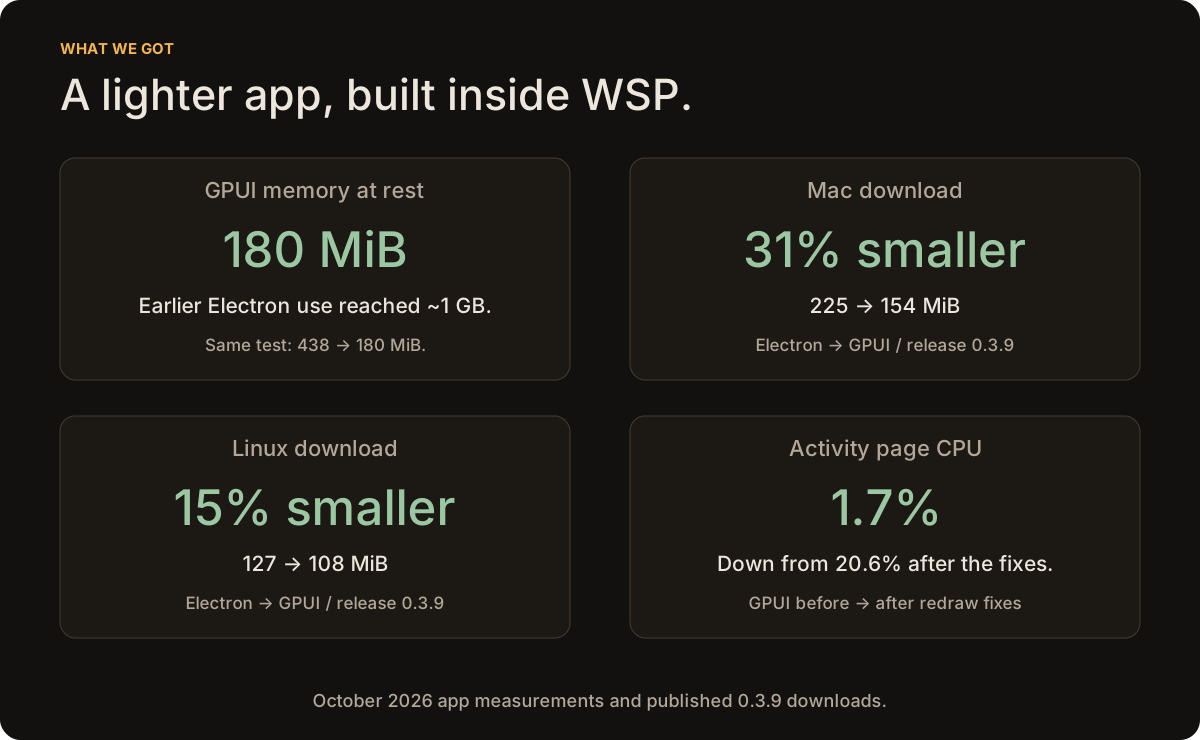
The download comparison uses the published Electron and GPUI packages from 0.3.9.
The bottleneck moved
Getting another screen built wasn't the slow part anymore. Opening it, trying the awkward cases, and finding what the tests missed still came back to me.
The bottleneck had moved from writing the UI to checking that it worked.
That led to gpui-agent. It lets an agent read a GPUI screen, click, type, scroll, and capture what happened. The builder can try its own work before handing it back.
It can also launch a development build on Linux without a display or GPU, using a virtual display and software rendering. That makes the same loop possible on Boat: build, open the app, try it, send back evidence.
In one WSP check, an agent created a thread, chose Codex, sent a message, and checked the reply. In another, it tried btop in the terminal, read that the window was too small, and dragged the divider up before checking again.
I still decide whether it feels like wsp. More of the checking can happen before it reaches me.
We got a smaller app out of this. But we also put wsp through the work we'd built it for: several computers, separate builders and reviewers, and thousands of things to verify.
I kept using wsp while the agents inside it rebuilt the app around me.