The context window
The context window is how much text a model can hold at one time. That text is your messages, its replies, the files it read and the output of its tools. The count is in tokens. When the window is full, the agent has to drop or compact what it holds before it can go on.
wsp shows how full the window is as a small ring in the thread's top bar. It is the first button there.
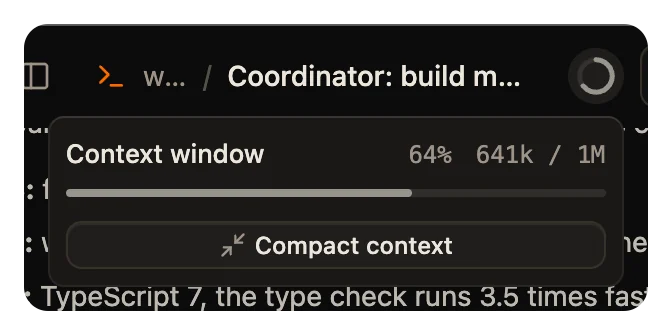
Read the ring
The ring fills with the share of the window that the model held at the latest turn. Point at it to open its card. The card shows:
- Context window, with the share as a percentage.
- The tokens held, out of the size of the window, for example
84.2k / 200k. - A meter of the same share.
The count comes from what the agent reports at the end of a turn. While a turn runs, the ring shows the count from the turn's last call to the model. The window is the newest one that the agent named.
The ring has one color. It does not change color as the window fills.
When the ring has no number
Some agents report less than others. The card then says why a part is missing:
| The card says | Why |
|---|---|
| Shows once the agent reports what it holds | The agent has said nothing yet of what it holds. |
| The limit shows once a turn finishes | The count is in, and no turn has named the size of the window yet. |
| Agent does not report its limit | The agent reports a count but no window size. OpenCode is one. |
| Agent does not report how much context it holds | The agent reports no count. Cursor is one. |
| The agent reported nothing before the turn failed | The latest turn failed before the agent sent a count. |
Claude Code and Codex report both the count and the window.
Compact the context
To free up room, click Compact context on the card. wsp sends the agent's own compaction command, /compact, as a turn of its own. The agent then replaces what it holds with a summary.
The button shows only for Claude Code and Codex, which have a compaction command. It does not work while a turn runs.
When an agent compacts, the thread shows a line such as Compacted the context, 180k to 24k tokens. An agent can also compact by itself when its window fills. That is the agent's own behavior, not wsp's.
Pick a bigger window
Some models come in more than one window size. Where the agent offers a choice, the composer's reasoning menu has a Context window group. The pick applies from the next turn.
