Leads and sub-threads
An agent in one thread can start other threads. A Claude Code thread can start a Codex thread to review its branch, on your Mac or on another computer. When the Codex thread is done, the Claude Code thread reads what it found. Every one of those threads is in your sidebar.
The thread at the top of such a tree is the lead. The threads it started are its sub-threads. A sub-thread can start threads of its own, so a tree can be several levels deep.
How an agent starts a sub-thread
An agent starts a sub-thread with wsp run, or with the run tool when it has the wsp tools. It names itself as the thread to tell when the sub-thread ends:
wsp run lab --agent codex --notify me "Review the branch fix/login and list what is wrong."
--notify me names the caller. Inside a thread that wsp started, me is that thread. In your own terminal, me is you. --notify <thread> names another thread in the same tree: the lead, a thread beside the caller under that lead, or a thread the caller started. The flag repeats, and each target gets the line once.
When the sub-thread's turn ends, wsp sends one line to each target, as a message into that thread:
thread 1a2b3c4d finished (completed, 12m 4s, $0.41): <last line of the reply>
A thread gets the same facts and then the whole final reply, so the lead can act on the report at once. You get the last line, in the app. If the target thread is gone when the sub-thread ends, the line comes to you instead.
So a lead does not wait or poll. It starts its sub-threads with --notify me and ends its turn. Each finished line starts the lead's next turn. See Coordinating threads from an agent.
The tree in the sidebar
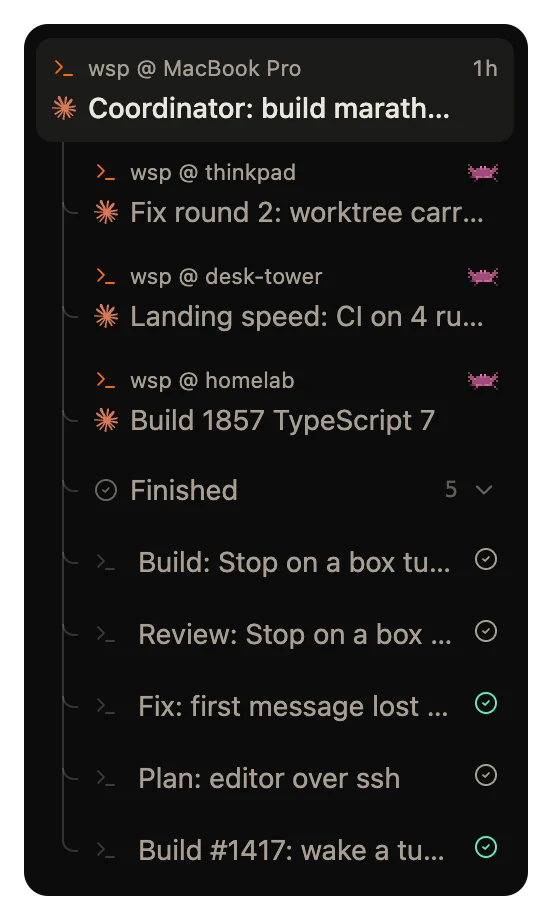
Sub-threads hang under their lead's tile, the live ones first. The tree nests two levels and then stays at that indent. A line from the parent's status mark leads to each child.
- The control at the end of a tile's second row folds the tree. A folded tile shows how many of its threads are live.
- Finished sub-threads go into a Finished fold under the live ones. It opens 20 rows at a time.
- A subagent, which is the agent's own helper inside one turn, shows as a slim row with a bot icon. Click it to open its own page. Back to lead returns to the lead.
wsp threads --tree prints the same tree in a terminal. Each level indents two spaces in the THREAD column. Subagents print under their thread, with their id in the TASK column and agent in the BY column.
A sub-thread inside the lead's transcript
Each sub-thread also shows as a tile in the lead's transcript, at the place where the lead started it. The tile shows the agent, the title and the status. Its second line shows the question the sub-thread asks, why it failed, or its last line. If the sub-thread runs on a computer other than the lead's, the line names that computer.
Click the tile to open the sub-thread. On hover, the tile offers Stop thread or Settle thread, and More. To send a sub-thread a message without opening it, use its row in the Threads section below.
At the end of a lead's transcript, above the composer, the Threads section lists the whole tree. Shut, it shows a status mark and a count for each status in the tree. Hover over the working count to read it in words, such as "2 threads and 1 subagent working". Open, it shows the live rows, then a Finished fold and a Settled fold, and a Settle N finished button. Each row there has Send a message, which writes into that thread from the lead's page.
Settle and restore
To settle a thread is to fold it, and every thread under it, into the Settled section at the foot of the sidebar. Nothing is deleted. A settled thread comes back by itself on its next turn.
- On a quiet tile, click the settle button. Its tooltip is "Settle". The button shows only when nothing in that tree still works.
- Right-click a Finished fold and choose Settle N finished.
- Drag a lead's tile onto Settled.
- Leave it. Settings > General > Settle a thread after settles a thread you have read once it is quiet for that long. The default is 2 hours.
After a settle, a notice says how many threads settled, with an Undo button. A tree with a thread that still works or asks stays where it is.
From a terminal:
wsp thread settle 1a2b3c4d
wsp thread settle 1a2b3c4d --finished
wsp thread restore 1a2b3c4d
--finished settles the finished threads under the one you name, and not that thread. A failed thread stays out for you to read. wsp thread restore brings a thread back out of Settled with what the latest settle moved.
An agent settles only itself and the threads it started, never its lead. A subagent settles with its lead's turn.
Stop a tree
When you stop a thread, every running thread under it stops with it. The --subagent <id> flag of wsp stop stops one subagent alone, and the turn goes on.
Restart a thread that failed
wsp run --replaces <thread> starts a new thread in place of a stopped or failed one. wsp settles the old thread once the new one starts, so you see one row. The new thread's tile says "Restart of the one stopped" and how long ago. Its menu offers Open the thread it replaced.
Where to read more
wsp run, wsp threads, wsp thread settle and wsp thread restore list every flag.
